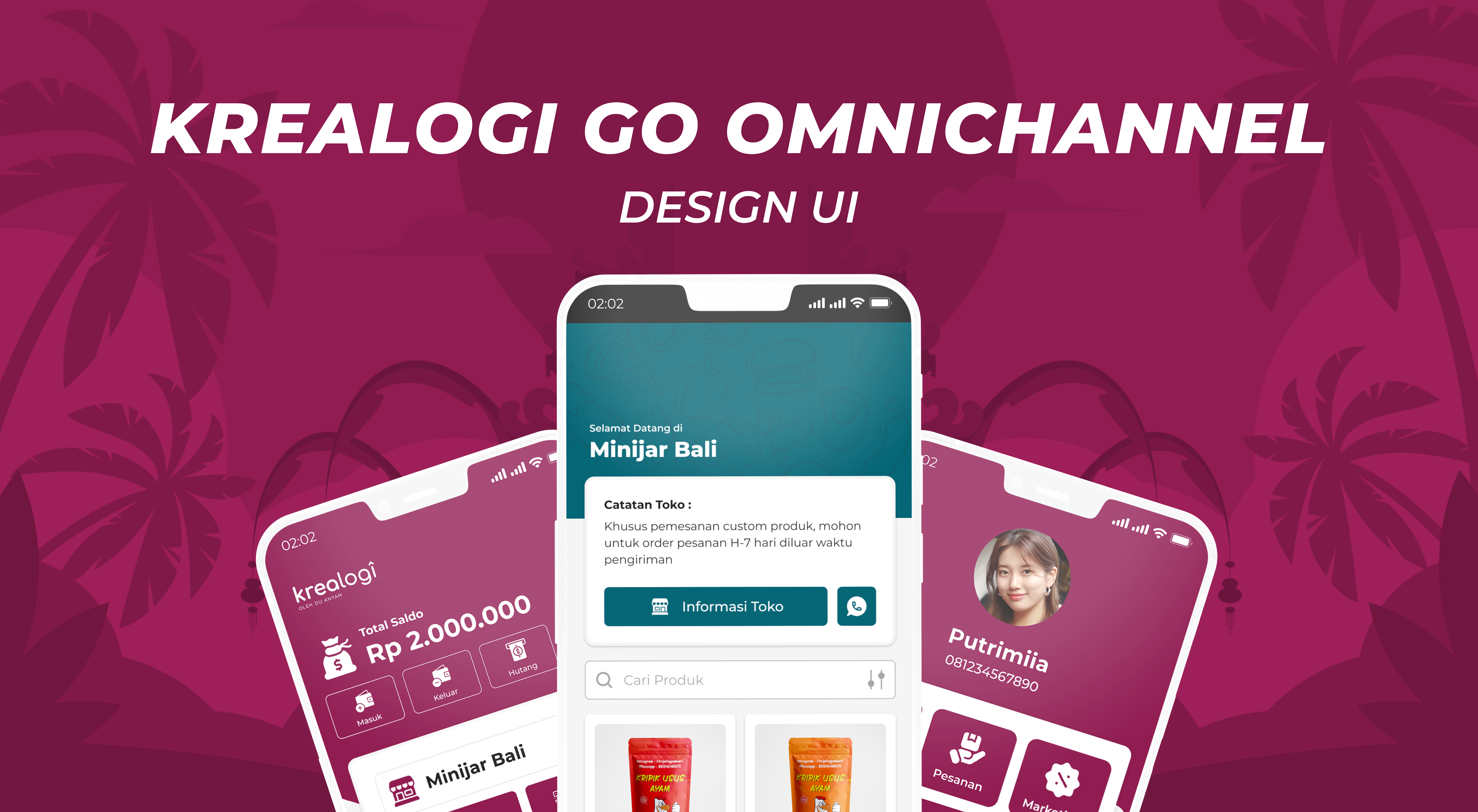

I took this training because I wanted to upgrade my skills in UI/UX Design. I want to learn about the basics of UI/UX Design because I was a graphic designer before. This is my first career switch, and I found my passion in UI/UX Design. I love researching, analyzing, and finding solutions for any problems in business. Thankfully, I got the Completion with honors. The Case Study of this training is my mission to redesign the B2B Krealogi application according to usefulness.

Mockup by Magnific

Disclaimer: This project is part of the Skilvul DTS PROA UI/UX Design Batch 3–2022 program, organized by the Ministry of Communication and Informatics, with Skilvul and Krealogi as Challenge Partners. I am not an employee of Krealogi, nor does any professional contract with them bind me.
Krealogi is a mobile application that serves as a tool for recording operational activities and creating strategic plans. It features Production Planning, Transaction Recording, Business Reporting, Order Management, and Warehouse Management. This is a B2B (Business-to-Business) application where vendors/sellers can process orders from customers in both small and large quantities. The application greatly assists MSMEs (Micro, Small, and Medium Enterprises) in increasing productivity regarding order processing and inventory recording.
However, as times become increasingly sophisticated, the needs of MSMEs regarding vendors/sellers continue to grow. Furthermore, many competitors similar to the Krealogi application have already updated their features, making them more effective for sales. Therefore, Krealogi is issuing a challenge for training participants to propose new features, such as: Simple CRM, a Cash Flow Feature, and Integration with Logistics & Marketplaces. Meanwhile, the existing features include: Production Planning & Monitoring, Sales Recording, Expenses Report, and Inventory Management.
Below is the interface of the Krealogi application as seen on the Google Play Store:

Krealogi App Interface

Meanwhile, the preliminary brief data for future survey development has been summarized by Krealogi, consisting of four user persona types as shown in the image below:

Krealogi User Persona Data

After identifying the features requested by Krealogi, I challenged myself and my skills to take on the Logistics & Marketplace Integration and Simple CRM features, as well as to update the application's Digital Catalog into a more modern Online Catalog (E-Catalog). This component plays a crucial role in supporting the user experience flow for the demo app design that I will develop.
Here are some of the tools used in the project development process:

Project Development Tools

As a UI/UX Designer, I am responsible for:
- Analyzing pain points from the identified feature challenge.
- Defining "How Might We" (HMW) questions based on the identified pain points.
- Developing solution ideas and creating affinity diagrams.
- Prioritizing feature ideas for the menu display.
- Researching the Krealogi application.
- Conducting competitor research on applications with similar features.
- Performing data research on CRM features and 3rd-party integrations.
- Researching UI designs from various design community websites.
- Creating user flows and wireframes for the application.
- Designing high-fidelity (Hi-Fi) application interfaces.
- Building application prototypes for demos.
- Designing interview scenarios for user respondents for usability testing.
- Conducting surveys with potential users via Google Forms.
- Summarizing survey results collected from users.
- Refining UI designs based on feedback to improve user comfort and usability.
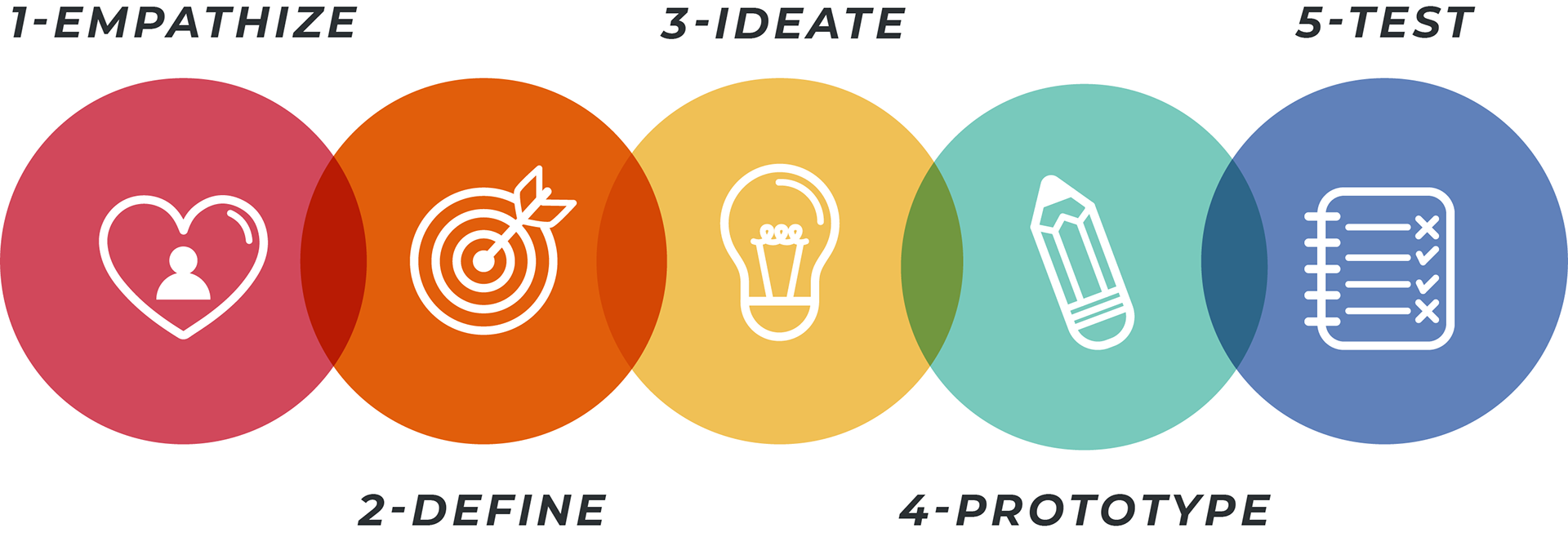
In this project, I chose the Design Thinking methodology because I believe the process is highly flexible, intuitive, and provides a clear framework for tracking progress from the initial problem discovery to the final solution.

Design Thinking by Magnific

Phase 1 (Empathize)
In the Empathize phase, I explored the issues within the Krealogi application. The first set of problems I identified came from Krealogi's own project brief, which is as follows:

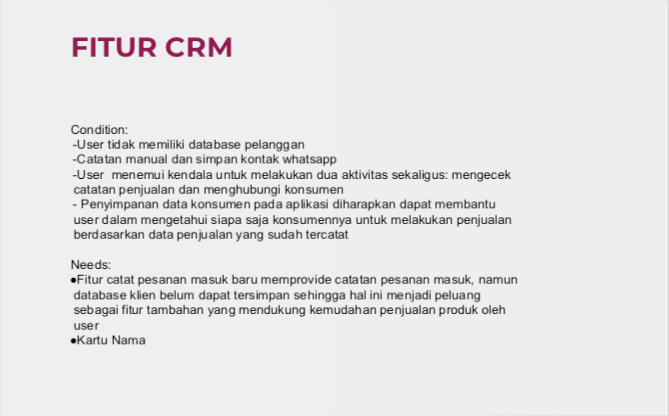
Krealogi Data Brief: CRM Feature

Krealogi Data Brief: Logistics Integration Feature

In addition, I identified several minor issues that could actually have a significant impact on the Krealogi application. These include an incomplete dashboard view, incorrect item specifications within the warehouse stock menu, a lack of interactivity in the customer contact feature, an incomplete transaction recording system, an overly convoluted production planning system, and a manual order recording process that hinders vendors and sellers, especially independent producers without partners, from maximizing their order preparation. Furthermore, the overall user interface appears unrefined. Therefore, my solution is to redesign the application to better align with user needs, specifically by implementing a confirmation button system. This will not only improve usability but also enhance overall performance efficiency in processing orders.
Phase 2 (Define)
In the Define phase, I identified "Pain Points", a collection of features that are currently missing or lacking in usability, and "How Might We" questions, which helped me determine how to design effective and appropriate solutions for the application I am developing. Below are the results of my analysis:

Pain Points

How Might We

Phase 3 (Ideate)
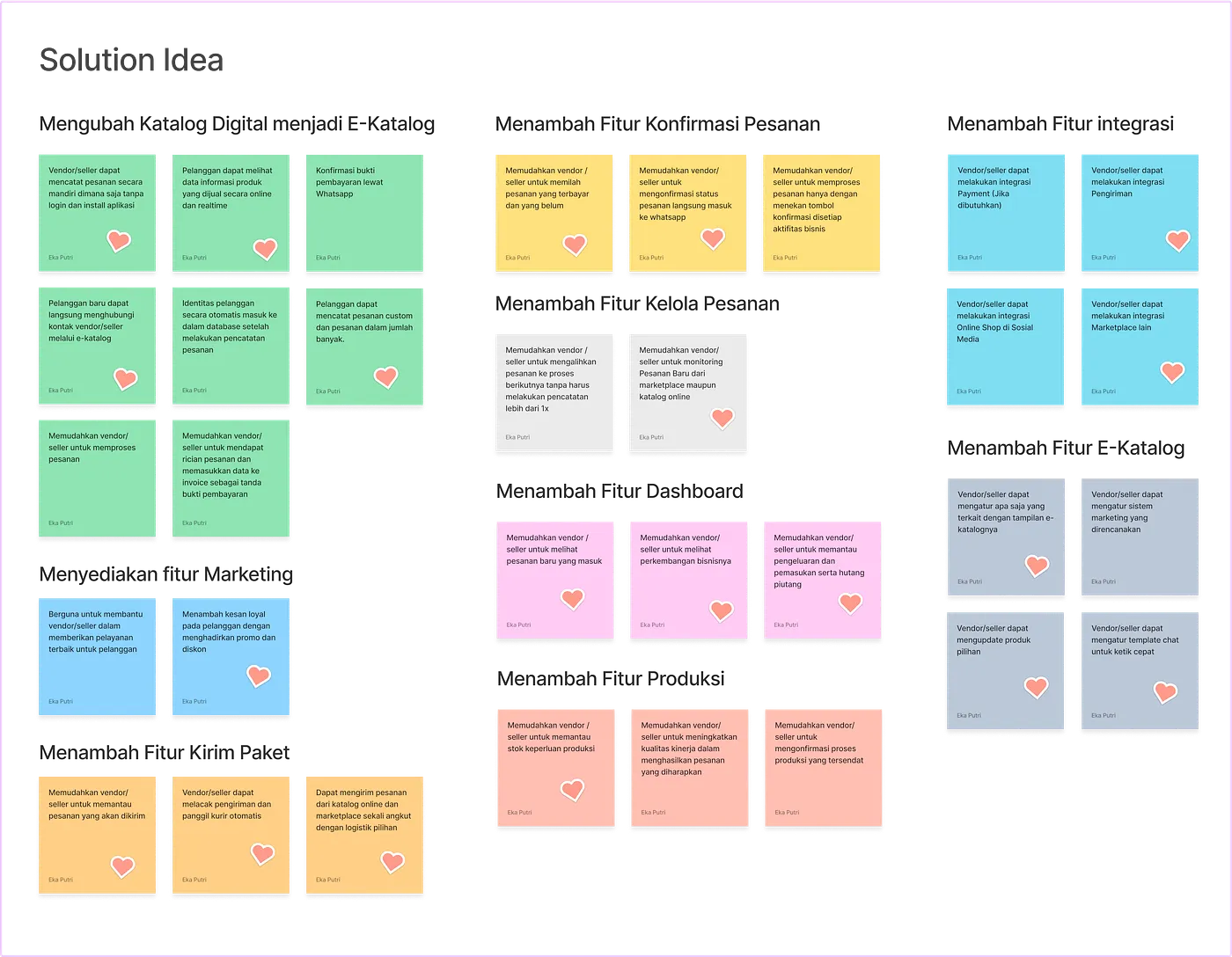
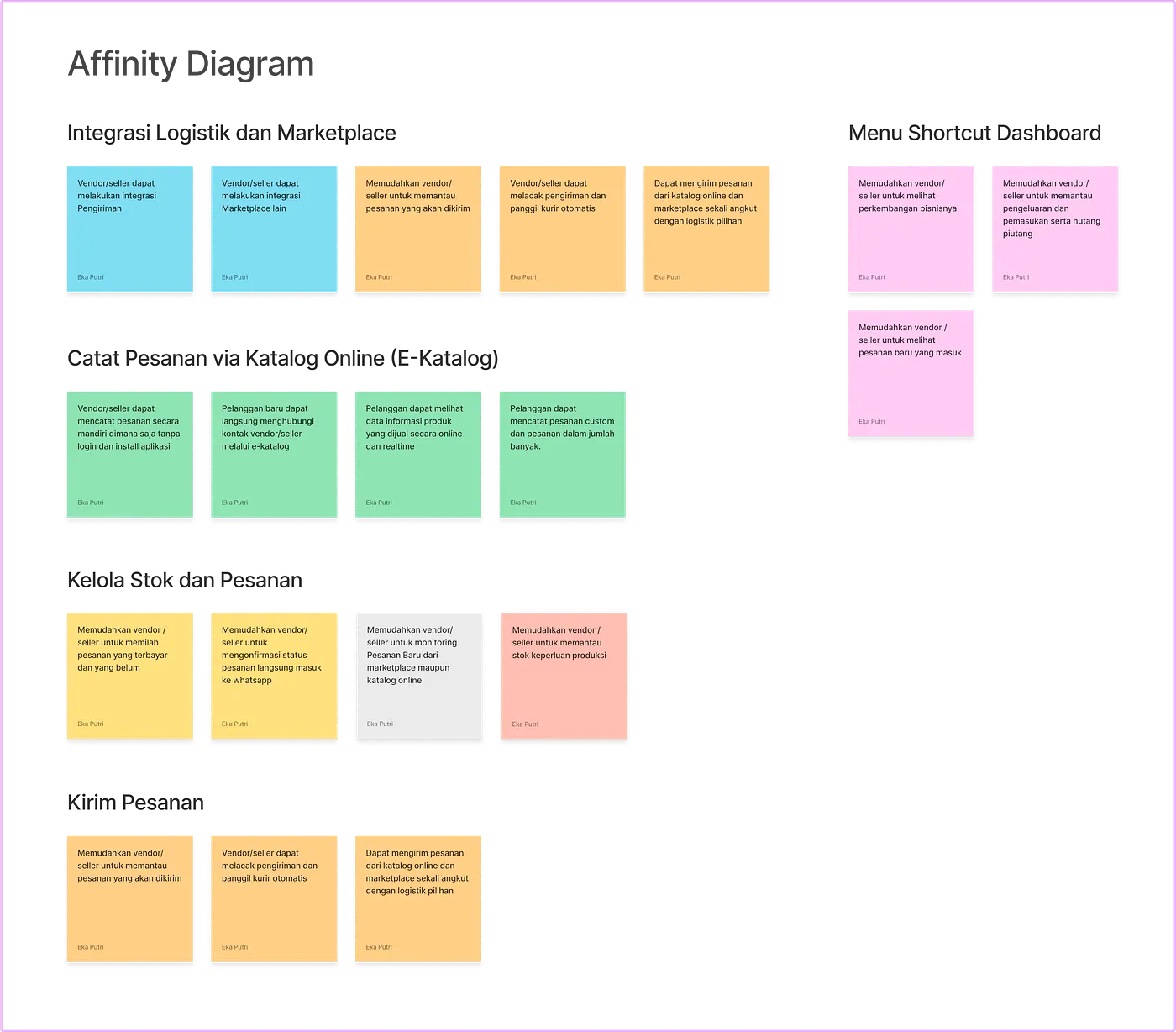
After formulating the "Pain Points" and "How Might We" questions, I summarized potential solutions in the "Solution Idea" phase. I then grouped several of these solutions into a set of features that will be implemented in the application, as shown in the "Affinity Diagram" below:

Solution Idea

Affinity Diagram

After the "Affinity Diagram" is finalized, the next step is to determine the "Prioritization Idea" scale, where we prioritize which feature ideas will have the greatest impact and provide the most value to users, as shown below:

Prioritization Idea

Phase 4 (Prototype)
In the prototyping phase, before proceeding to the final design, we must go through the development of User Flows & Wireframes, the Design System (Color Style, Typography, Iconography, Molecules), UI Design, and finally, UI Design Prototyping.
A. User Flow & Wireframe
The next stage involves creating "User Flow" and "Wireframes" for each task, representing the implementation flow for the prioritized application ideas. These are still presented in a simplified format, such as diagrams and Low-Fidelity (Lo-Fi) application design layouts.
Task 1 — Logistics and Marketplace Integration

User Flow for Logistics and Marketplace Integration

Wireframe for Logistics and Marketplace Integration

Task 2 — Record Orders via Online Catalog (E-Catalog) and Add Stock​​​​​​​

User Flow for Recording Orders via Online Catalog (E-Catalog) and Stock Replenishment
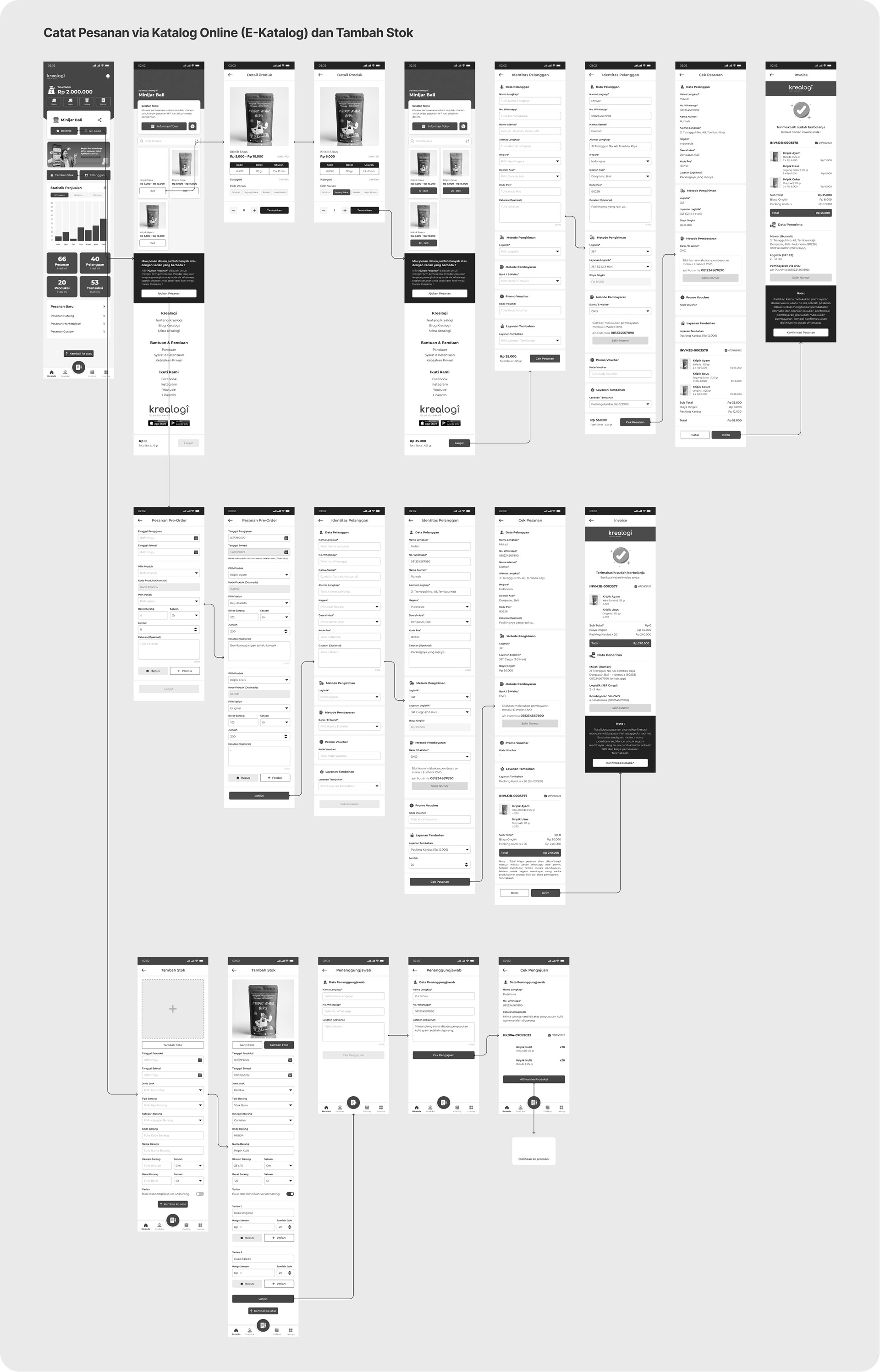
Wireframe for Recording Orders via Online Catalog (E-Catalog) and Stock Replenishment

Task 3 — Manage Stock and Orders

User Flow for Stock and Order Management

Wireframe for Stock and Order Management

Task 4 — Ship Orders

User Flow for Order Fulfillment (or Shipping Orders)

Wireframe for Order Fulfillment (or Shipping Orders)

B. Design System (Color Style, Typography, Iconography, Molecules)
The Design System consists of several graphic design components that support the UI development process, such as colors, text styles, font types, icons, and various button and menu structures required for the application.

Colour Style

Tipography
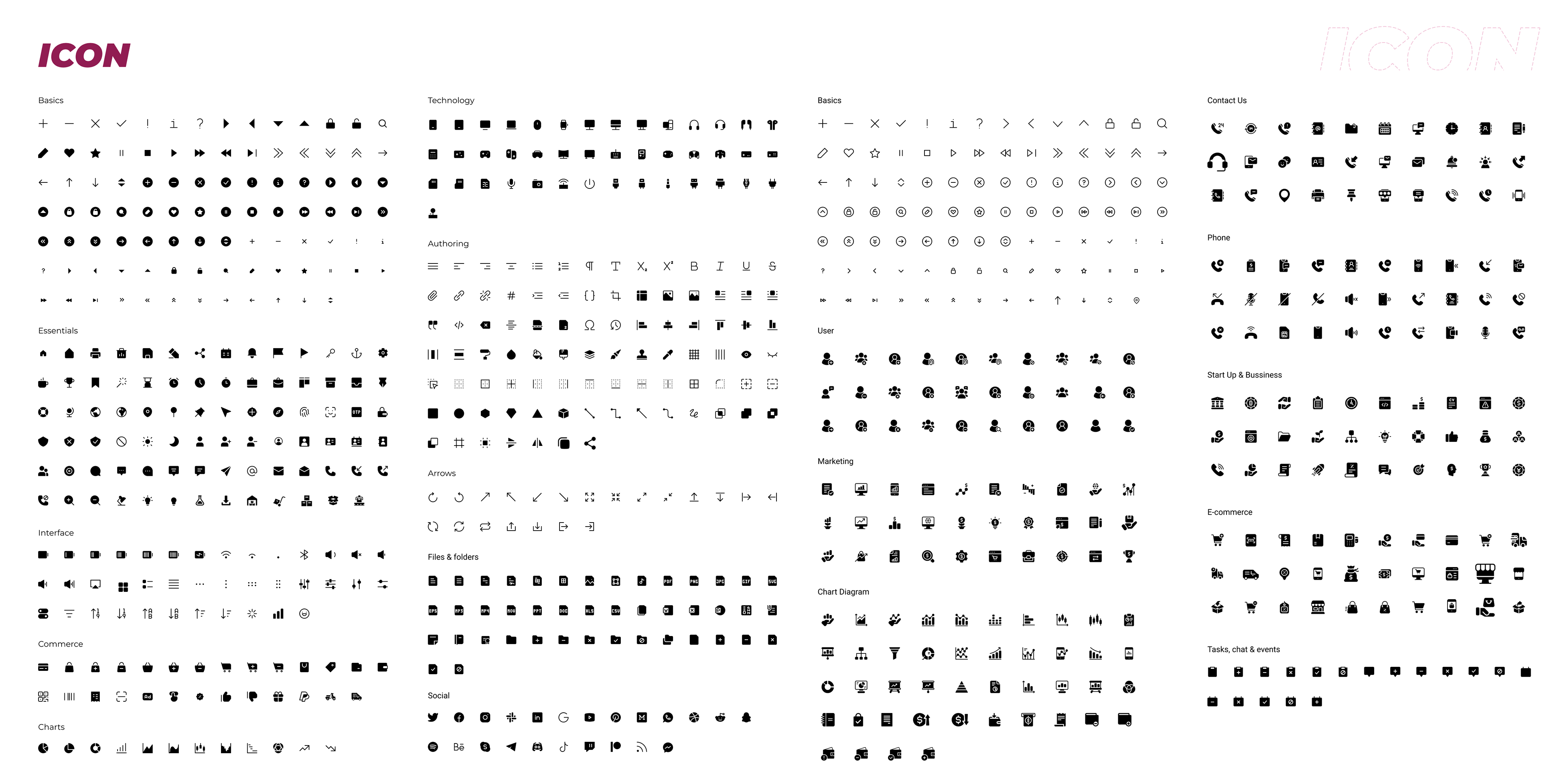
Iconography

Molecules

C. UI (User Interface) Design
The UI Design section features high-fidelity (Hi-Fi) mockups of the application for all the tasks that have been created.

Task 1 - Logistics and Marketplace Integration
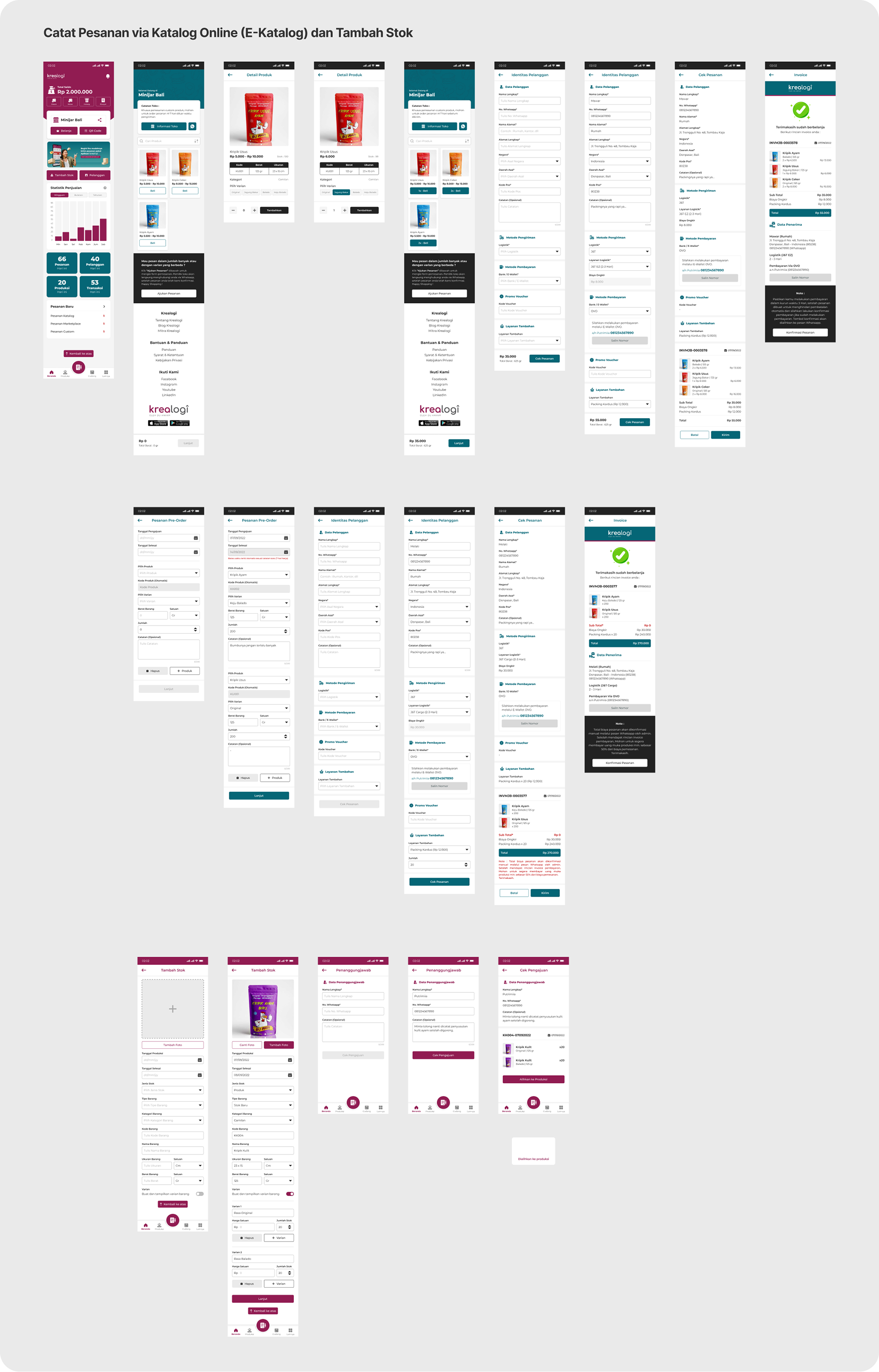
Task 2 - Recording Orders via Online Catalog (E-Catalog) and Stock Replenishment
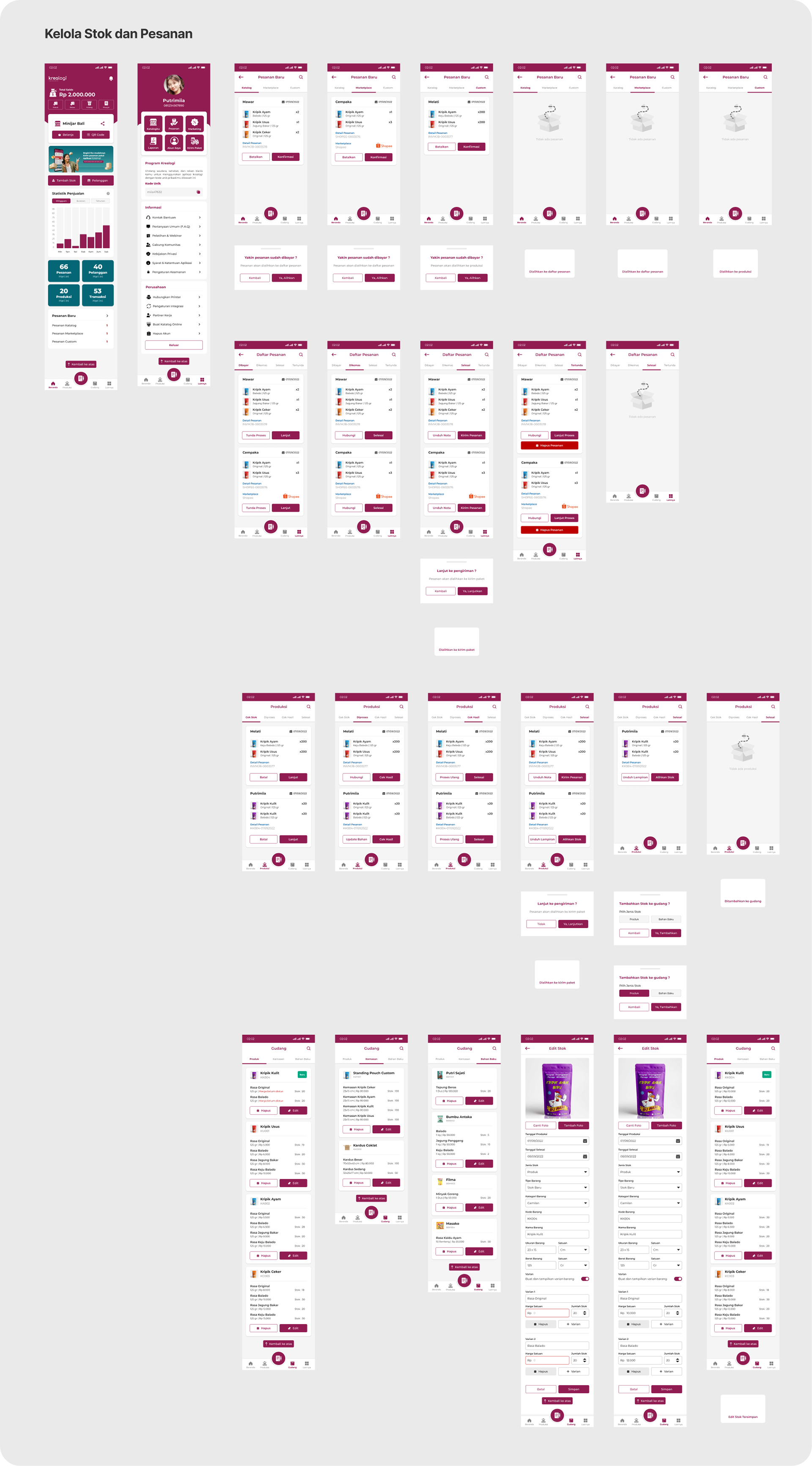
Task 3 - Stock and Order Management

Task 4 - Order Fulfillment (or Shipping Orders)

D. Prototyping Design UI
Phase 5 (Usability Testing)
In the Usability Testing phase, I employed a quantitative survey method, where I interviewed prospective user respondents using an online, self-administered Google Form. Before proceeding to the interview stage, I prepared the User Research stimulus data, which includes the following:
- Research Objective: The goals we aim to achieve to ensure the project's testing success.
- Respondent Criteria: The specific criteria for the user respondents who will serve as participants for the survey interviews.
- List of Questions: A list of questions designed to explore general information regarding the participants' experiences after testing the application demo.
- Research Scenario: This consists of the step-by-step interview process, as well as detailed statements for evaluation guidelines using the SUS (System Usability Scale) and SEQ (Single Ease Question).
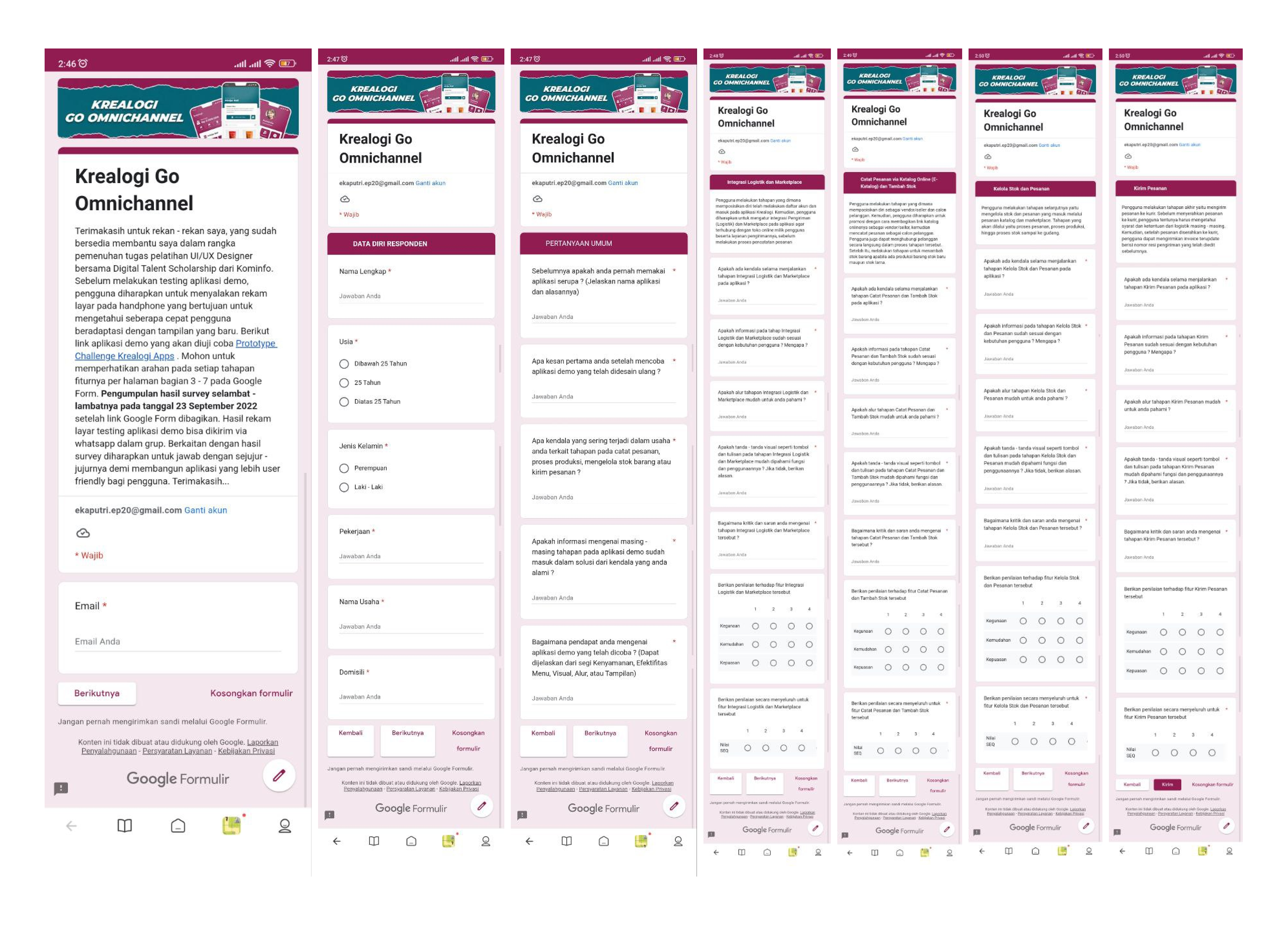
The following is the layout of the Google Form I created to serve as a survey template:
For the prospective user respondents, I recruited individuals from my previous workplace and university colleagues. Based on the survey results, the following is a summary of the average scores for the SEQ (1–7) and SUS (1–5) obtained from each respondent for every task they attempted, along with the feedback provided:
Following the critique and feedback obtained from the Usability Testing sessions, I have identified several task areas that require design iteration: the Menu Tab Navigation, Expedition Filter, and Logistics Classification. Additionally, I addressed concerns regarding the "Stock and Order Management" task. I realized there was a misnomer in my terminology; many users speculated that "Stock and Order Management" should involve the ability to create, add, and edit stock manually. In reality, the intended "Add Stock" functionality was already integrated into the dashboard, adjacent to the "Customer" menu. Below are the resulting design iterations:

Design Iteration Output

Conclusion
This UI/UX Case Study has been a profound learning experience. Although I have significant experience as a senior creative professional, this project highlighted the importance of continuous learning. Transitioning from a Graphic Designer to an entry-level UI/UX Designer, I realized how unfamiliar I was with industry-specific terminology, having previously relied primarily on analytical skills and basic design principles. This was the first project that I fully committed to with such depth. While I was challenged to complete every phase, I encountered some difficulties during the UX research stage regarding the selection of information sources. It became clear that conducting in-depth case research requires a substantial investment of time.
I have many new plans and ideas that I would like to incorporate into the Krealogi application design, which could significantly enhance the performance quality of MSMEs. In my opinion, this application has great potential if further developed, particularly in terms of additional menu features and UI updates. Specifically, I would like to add a 'Production Calendar' feature—which is highly effective for identifying busy production periods, allowing producers to inform customers when their orders are scheduled for the next production queue with adjusted dates. There are several other features I have already integrated into the design, but I could not proceed with them due to the project submission deadline.

You may also like

Back to Top